HTML (HYPER-TEXT MARK UP LANGUAGE)

Our reflection about HTML is since it is used to create web pages that are displayed on the Chrome or Windows Internet Explorer. HTML is easy to code if you know the basic structure of HTML.  HTML is interesting for us since web designing is new for us. HTML allows us to make simple web pages like slum book making it beautiful by adding background colors, make the font texts colorful, resizing the font text, and also adding our picture into the web page making it the background picture.

Here are the basic structure of making Slum book web page:

<html>
<title>Nedie’s Slumbook</title>
<center>
<img src=”C:\Users\Nomer\Desktop\nedie (2).jpg”>
<p Style=”font-size:60px;color:#581845″> MY SLUMBOOK</p>

<body bgcolor=”#FFA07A”>
<table>
<tr>
<td Style=”font-size:25;color:#581845″> PERSONAL INFORMATION:</td>
</tr>
<tr>
<td></td>
</tr>
<tr>
<td>Name:</td>
<td> Nedie P. Don</td>
</tr>

<tr>
<td> Nickname:</td>
<td>D.I, Neds, Neday</td>
</tr>
<tr>
<td> Birthday:</td>
<td>March 30, 2001</td>
</tr>
<tr>
<td> Age:</td>
<td>17 years old</td>
</tr>
<tr>
<td> Gender:</td>
<td>Female</td>
</tr>
<tr>
<td> Birthplace:</td>
<td>Sorsogon</td>
</tr>
<tr>
<td> Province:</td>
<td>Sorsogon</td>
</tr>
<tr>
<td> Address:</td>
<td>123 san Juan St. Brgy. Mayamot Antipolo Rizal</td>
<tr>
<td Style=”font-size:25;color:#581845″> KNOWING ME BETTER:</td>
</tr>
<tr>
<td></td>
</tr>
<tr>
<td>
How many sibling do you have?:</td>
<td>2 including me</td>
</tr>
<tr>
<td> What is your favorite holiday?:</td>
<td>Christmas and New Year</td>
</tr>
<tr>
<td> What is your favorite color?:</td>
<td>Purple</td>
</tr>
<tr>
<td> Where do you want to travel?:</td>
<td>South Korea and England</td>
</tr>
<tr>
<td> Name 3 foods that would be hard to live without?:</td>
<td>Burger, Spaghetti and Adobo</td>
</tr>
<tr>
<td> Name 2 movies that you love?:</td>
<td>Sierra Burgess is a Loser and Midnight Sun</td>
</tr>
<tr>
<td> If you could pick 3 Careers in you life what would it be?:</td>
<td>Cabin Crew and Hotel Receptionist</td>
</tr>
<tr>
<td> If you had any super power what would it be?:</td>
<td>A power to stop the time</td>
<tr>
<td Style=”font-size:25;color:#581845″> GET ON MY EMOTIONS:</td>
</tr>
<tr>
<td></td>
</tr>
<tr>
<td>What makes you sad?:</td>
<td>Movies and Korean Dramas</td>
</tr>
<tr>
<td> What makes you angry?:</td>
<td>When someone or somebody ignored me and I don’t know the reason behind it</td>
</tr>
<tr>
<td> What makes you happy?:</td>
<td>Foods,Friends and Family</td>
</tr>
<tr>
<td> What makes you go back in time?:</td>
<td>Letters and Pictures</td>
</tr>
<tr>
<td> What makes you keep going?:</td>
<td>My family who never stop supporting me</td>
</tr>
<tr>
<td> Who is the person you wish you could go back in time and talk to?:</td>
<td>My Grandmother</td>
</tr>
<tr>
<td> Who is the last person you wanted to talk to everyday?:</td>
<td>Myself and my family in Bicol</td>
</tr>
<tr>
<td> Who is the person that makes you happy?:</td>
<td>God, Family, Friends and My crush</td>
</tr>
<tr>
<td> Who is the person that makes you sad?:</td>
<td>My family in Bicol</td>
</tr>
</center>

</table>

</html>
 

Online Platforms

Online Platforms

Technologies that are grouped to be used as a base upon which others applications processed or technologies are developed . And it is where you can share your thoughts and opinions using these online plaforms;

Social Media

These are applications that enables users to create, share, and express their thoughts or feelings. Examples of these applications are :

Facebook

Facebook is an American online social media and social networking service company based in Menlo Park, California. It’s website was launched on February 4, 2004 by Mark Zuckerberg etc.

Twitter

Founded in March 21, 2006 by Jack Dorsery( the current CEO ), Noah Glass, Biz Stone, Evan Williams.

LinkedIn

Founded on December 28, 2002, by Reid Hoffman Konstantin Guericke, Jean- Luc Vaillant, Allen Blue, Eric Ly, and launched on May 5, 2003.


Blogging Site

This online platforms focus on content and design. It typically looks like a newsletter where you are given options to change the design to your liking. Though you can manipulate the design, social media platform’s popularity is still unrivaled. Examples of these applications are:

WordPress

WordPress is a free and open source content management system based on PHP and MySQL. Features include a plugin architecture and a template system. It is most associated  with blogging, but supports other types of web content including more traditional mailing lists and forums, media galleries, and online stores.

Joomla

Joomla! Is a free and open source content management system for publishing web content by Open Source Matters, Inc. It is built on a model- view – controller web application framework that can be used independently of CMS.

Tumblr

Tumblr is a microblogging and social networking website founded by David Karp in 2007 , and owned by Oath Inc. The service allows users to post multimedia and other content to a short-form blog. Users can follow other users’ blogs. Bloggers can also make their blogs private.

CMS

Content management System (CMS) is a computer application (sometimes online or browser-based) that allows you to publish, edit and manipulate, organize and delete web content. CMS is used in blogs, news websites, and shopping.

File Sharing Platform

This online platforms allows you to share and stored your files through online using these examples:

Dropbox

Dropbox is a file hosting service operated by American company Dropbox, Inc., headquartered in San Francisco, California, that offers cloud storage, file synchronization, personal cloud, and client software.

ShareFile

ShareFile is a secure content collaboration, file sharing and sync solution that supports all the document-centric tasks and workflow needs of small and large businesses. The company also offers cloud-based/on-prem storage, virtual data rooms and client portals. ShareFile is owned by Citrix Systems.

Google Drive

Google Drive is a file storage and synchronization service developed by Google. Launched on April 24, 2012, Google Drive allows users to store files on their servers, synchronize files across devices, and share files.


Imaging and Design for Online Environment

Photo editing enhances the processes of reforming images into a better look whether they are digital photographs, traditional photo chemical or even illustrations. There are four types of photo editing; adobe photoshop, adobe lightroom, corel draw, and gimp.

Graphic software programs is where you can broadly enhance and transform images. The vector graphics editor and 3D modellers are the primary tools to manipulate. Many photo editing programs  can be used to create computer art from scratch.

Here are some examples:

Adobe Photoshop, adobe illustrator, corel draw, gimp, inkscape, blender, MS painto/paint 3D paint tool SAI.

Basic of image editing has two types;

Vector that not change the direction of the lines, biezer curves and text while the Raster images in a form of a grid of picture elements or what we called pixels.

3D modelling is a type of processing images into a mathematical representation of any surface specialized by the software. 3D image can process through what we called 3D rendering or the used any computer stimulation.

There are the types of imaging formats that you might used:

JPEG for loosy compression of images.

PNG that support loseless data compression.

GIF that supports both animated and static images.

BMP use for restoring bitmap images.

EPS used for vector based image only.

SVG can form two dimensional graphics that supports ineractivity and animation.

.3DS can used by the Autodesk 3Ds Max 3D modeling also for rendering software.

.FBX an exchange format between Autodesk products.

Common Features of Image Editors

It is where you can find what you need  and wanting to be need just to enhance your photos from simple to a better image. Also to create your own image in any types.

Photo editing is where you edit some simple errors in your image while photo manipulation is where you can enhance and change it from simple to incredible one.

Infographics  also known as data visualization, information design and communication design that can used

Office Productivity

Office productivity

Is were you can process some documents. There are lot of open source that might help you with your file like open office, libre office, google docs, free office, WPS, only office while in commercial there is MS office. Open productivity has four types  the word/writer, powerpoint/ presentation, excel/calc, access/base.

Access is a database management system (DBMS) it combines the relational of the Microsoft Jet database Engine with a graphical user interface and software-development tools, it can also used to develop application software.

Word is a word processor developed by Microsoft. By using word you can easily create some words that you wanted also includes the font, size, background and etc.

One note is computer program that allows you to share your notes to another  OneNote user all over the internet or a network.

Excel is a type of computer program that features calculation, graphing tools, pivot tables, and micro programming language called Visual Basic for Application that you wanted to access.

Outlook is a personal information manager from Microsoft. It is somewhat used for calendar, task manager, contact manager, note taking, web browsing and journal. But it is mainly used for email application.

Publisher  is an entry-level desktop publishing application from Microsoft. It is differ from Word because it is more focus on layout  and design not like the Word which focus on text composition and proofing.

Powerpoint is a presentation program. Created by Robert Gaskins and Dennis Austin at a software company named Forethought, Inc.  it was released on April 20, 1987 for Macintosh computer only but Microsoft paid $14 million three months after it came out. It is used in many ways to display some information in simple presentation to a better and multimedia presentation.


Netiquette

The Netiquettes

An etiquette means the forms  required by good breeding or prescribed by authority to be required in social  or official life. But when it comes to interacting through social media, we netizens should learn the netiquette or the form of good breeding but. Through internet manner.

Here are the 10 Rules of Netiquettes.

Rule # 1 Remember the Human

ALWAYS. Always remember that whenever you communicate through email, g-mail, or social media your words may be misunderstood. You will not see their facial expressions, gestures or hear the tone of their voice, so it is a must that you should be sensitive and be aware of your words for it to be clear and concise.

Rule # 2 Adhere to the Same Standards of Behavior Online That You Follow in Real Life

If you are a good citizen in the real world, you must also be a good citizen when it comes to cyberspace. Breaking the law is bad netiquette. So if you’re thinking of doing illegal thing though cyberspace, well you might also consider it as bad netiquette.

Rule # 3 Know Where You Are In Cyberspace

Because the cyberspace is not the same as the real world, it is important to know where you are or you might get lost. Just like in reality, when you enter a new place, it is better to look around and explore new things before getting hooked and before diving to that particular place.

Rule # 4 Respect Other People’s Time and Bandwidth

This is also an important rule when it comes to the netiquette, because as a cyberspace user, it is your duty and responsibility to ensure that your friends, followers or readers get some important information when it comes to reading your posts, or published works. Otherwise your friends and followers will not be interested in your posts.

Rule # 5 Make Yourself Look Good Online

Since people around the world is not aware of your identity and anonymity, might as well take advantage if it and make yourself look more trustworthy in the cyberspace. Don’t post things which are nonsense. And especially do not post things that can cause conflict with other cyberspace users.

Rule # 6 Share Expert Knowledge

This is a self – explanatory rule. If users asks questions that you may seem to know the answers, why not share your knowledge to them?

Rule # 7 Help Keep Flame Wars Under Control

DO NOT tolerate flame wars. If you find something that is not worth your time, report that user because if you tolerate opinions and posts that can hurt other individual, the cyberspace may be a world full of strong opinionated people whom are not open minded and are full of ignorant people who does not listen to what is better for them.

Rule # 8 Respect Other People’s Privacy.

One word only. Respect.

Rule # 9 Don’t Abuse Your Power

You can take advantage of your anonymity, but you should not abuse your power.

Rule # 10 Be Forgiving of Other People’s Mistakes

When you are in a cyberspace world you need to be open minded and understandable for other users. Forgive those users who have done wrong to you because God forgives you, you need to forgive the other users in the cyberspace.

Computer All Around Us

Our reflection to the title is computers can be used in many ways like Education which schools and other academic institution can used and also the computer helps in providing a lot of facilities in the education system. Science and research which Scientist use computers to invent new things such as medicine and ways to improve life. Air Travel which airports and airplanes use to navigate each other. Business which business man and woman used for calculation and other methods that the computer uses. Hospitals which become an important part in labs and dispensaries. Computers used in hospitals to keep the record of patients and medicines. It is also used in scanning and diagnosing different diseases. ECG, EEG, ultrasounds and CT scans, etc. are also done by computerized machines. Engineering and Architecture which used to create models of the house and other infrastructure/buildings. Telecommunications which used to convey a message, an idea, a picture, or speech that is received and understood clearly and correctly by the person for whom it is meant. Entertainments which used for animations, computer generated effects and so on. Governments offices used computers for Budgeting,Sales tax department, Income tax department, Computation of male/female ratio, Computerization of voters lists, Computerization of PAN card and Weather forecasting. And Space explorations which NASA used to discover, analyze and explore heavenly bodies in the universe.

Software, Hardware and Peopleware

Software it is the intangible part of a computer since it is a collection of computer programs, procedures, and documentation that perform some task on a computer system. There are types of software which is Applications, System and Utility. Applications use the services of the computer’s operating system and other supporting applications. System Software is software on a computer that is designed to control and work with computer hardware. The two main types of system software are the operating system and the software installed with the operating system, often called utility software. The operating system and utility software typically depend on each other to function properly. Operating system today are the Linux which is an open source software created by Linus Storvald,  Mac Os which is created by Apple Inc., Windows which is created by Microsoft and the last is Mobile Os an operating system for mobile phones like Android from Google and iOS from Apple Inc.

Hardware is the tangible part of a computer and the physical components that you can see and touch. These includes the input devices ,processor,  output devices and storage devices.

Peopleware can refer to anything that has to do with the role of people in the development or use of computer software and hardware systems. (ctto)
Here are the examples of Peopleware; Computer engineer, Software engineer, IT specialists, Website designers, Computer technicians or just a simple end user.


Different Categories of Computers

When people think “computers,” usually it’s something like a laptop or your office computer that comes to mind. Computers are actually all around us, and can be broken down into separate categories depending on their size and processing power. Certain definitions have changed over time with the speedy advances in technology – we have computers that can fit in the palm of our hands now that have as much processing power as a computer that was the size of a whole room half a century ago!

Here are the different categories of computer:

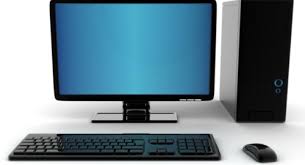
Personal Computer

3

It’s designed for only one person to use at a time. It’s fit to desk that’s why sometimes it is called Desktop computer. It’s also more convenient to be able to connect peripherals like screens and keyboard and computer mice that fit your needs. In this sense, desktop computers could be used at the office for professional tasks, or at the home.

Mobile Computer

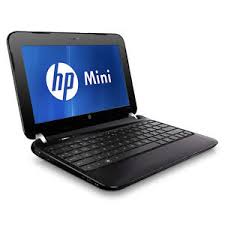
download (1)

Computers that are super small and mobile. It’s fits on lap or hand and all of its components are contained inside a panel that functions also as the keyboard, with an attached screen that can be folded over. Because of their size and convenience, these are some of the most popular computers for everyday use.

Game Consoles

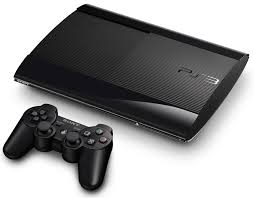
download (3)

Game consoles is small box or hand held device use for gaming that is primarily designed to play games that connects to a television. The game consoles generally consists of a handheld control device (although some use cameras to monitor user movements) and a computer that runs the game’s software.

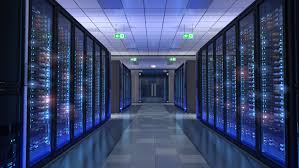
Servers

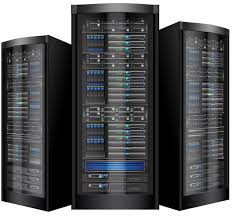
images (2)

A server is a computer designed to process requests and deliver data to another computer over the internet or a local network. Most computer networks support one or more servers that handle specialized tasks. It is usually stored in a small cabinet.

Mainframe

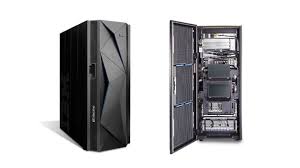
download (5)

Like supercomputers, mainframe computers are huge, towering machines with lots of processing power. Mainframe computers are mostly used by corporations, government agencies, banks, and organizations that need a way to store large quantities of information. Mainframe and supercomputer are not the same since they have different processing capabilities.

Embedded Computers

download (6)

Embedded computer is a single chip that contains all of the elements that are essential for any computer. It is also called as a micro-controller or microprocessor based system devised for specific function because the main purpose of an embedded computer is to control something.

Supercomputer

download (4)

Supercomputer is a full room equipment that have the most capable processing power of its time. Supercomputers run hundreds of thousands of processors, capable of computing quadrillions of calculations in just a few nanoseconds.  And actually,  NASA used supercomputers for servicing the entire space agency.


Components of a computer

Our reflection about the topic components of computer is a computer system is a collection of electronic and mechanical devices operating as a unit. These devices can be sorted according to the role they play in the computer system. The main parts of a computer system are:

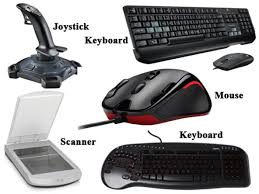
Input devicesdownload (5)

These devices are used to get data into the computer system processing devices. Input devices allow us to interact with computers in a variety of ways. If we couldn’t interact with the machines, what use would they be to us? Most input devices come in the form of peripherals, and can be divided into subcategories of their own: visual, audio, etc.

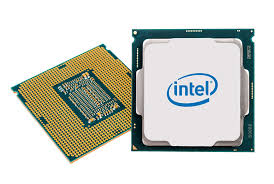
Processor2.jpg

Processor/Processing devices are exactly what they sound like. They are the devices that enable the computer to process information in the first place. All computers have some form of a processor. The computer you’re on right now likely has a CPU, or central processing unit, embedded onto its motherboard. This is where the computer carries out its complex calculations, processes info, and sends it out to its output devices to be conveyed to you in a manner that makes sense.

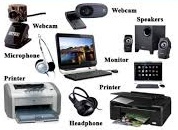
Output devicesdownload (6)

Output devices are the opposite of input devices. These are peripherals that essentially allow the computer to interact with us – they display information that we need to make decisions about how we interface with them.

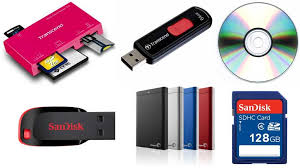
Storage devicesdownload (7)

That can store the data for use at a later stage communications devices and also these can send the data to another computer system. Most computers have some form of storage device that lets the machine record data on a temporary or permanent basis. Your standard personal computer will come with a primary storage device, which is a storage device that is a part of the hardware itself.


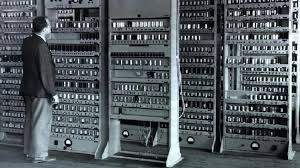
History Of Computer

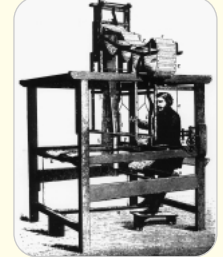
Our reflection about this topic history of computer is very helpful for us as a student, since this topic have the different kinds of computing machines that invented a long time ago. Computers are such an integral part of our society that it is sometimes difficult to imagine life without them. However, computers as we know them are relatively new devices. In fact, the first electronic computers were built just over fifty years ago. Since that time, the technology has advanced at an amazing rate, with the capacity and speed of computers approximately doubling every two years. First in 1801, Jacquard’s loom French weaver Joseph-Marie Jacquard creates an automatic, programmable weaving machine that creates fabrics with richly detailed patterns. It is controlled by means of punched cards.

1801
1801

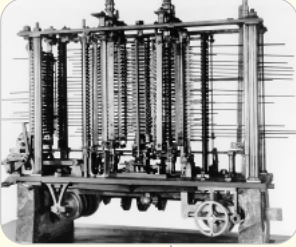
Second, the first multi-purpose or programmable computing device was probably Charles Babbage’s Difference Engine, which was begun in 1822 but never completed. In 1842, Babbage designed a more ambitious machine, called the Analytical Engine but unfortunately it also was only partially completed. Babbage, together with Ada Lovelace recognized several important programming techniques, including conditional branches, iterative loops and index variables. Babbage designed the machine which is arguably the first to be used in computational science.

1822
1822

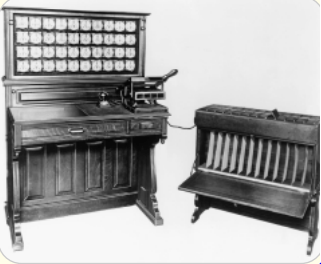
Third, The US Census Bureau was one of the first organizations to use the mechanical computers which used punch-card equipment designed by Herman Hollerith to tabulate data for the 1890 census. In 1911 Hollerith’s company merged with a competitor to found the corporation which in 1924 became International Business Machines (IBM).

1890
1890

Fourth in 1936, Alan Turing presents the notion of the universal machine, later called this the Turning machine, capable of computing anything that is computable. The central concept of the modern computer was based on his idea.

download
1936

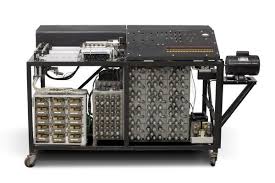
Fifth, the earliest attempt to build an electronic computer was by J. V. Atanasoff, a professor of physics and mathematics at Iowa State in 1937. Atanasoff set out to build a machine that would help his graduate students solve systems of partial differential equations. By 1941 he and graduate student Clifford Berry had succeeded in building a machine that could solve 29 simultaneous equations with 29 unknowns. However, the machine was not programmable, and was more of an electronic calculator.

download (1)
1937

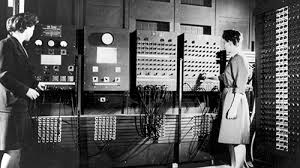
Six, the first general purpose programmable electronic computer was the 9 Electronic Numerical Integrator and Computer (ENIAC), built by J. Presper Eckert and John V. Mauchly at the University of Pennsylvania. It was a huge machine with a huge power requirement and two major disadvantages. Maintenance was extremely difficult as the tubes broke down regularly and had to be replaced, and also there was a big problem with overheating. The most important limitation, however, was that every time a new task needed to be performed the machine need to be rewired. In other words programming was carried out with a soldering iron.

download (2)
1943-1944

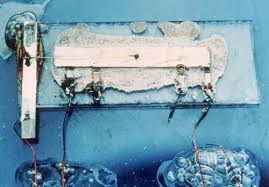
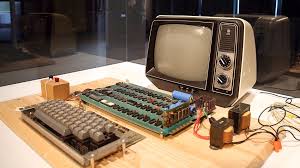
Seven in 1958, Jack Kilby and Robert Noyce unveil the integrated circuit, known as the computer chip. Eight in 1976, Steve Jobs and Steve Wozniak start Apple Computers on April fool’s Day and roll out the Apple I, the first computer with a single-circuit board, according to Stanford University.

download (3)
1958

Eight in 1976, Steve Jobs and Steve Wozniak start Apple Computers on April fool’s Day and roll out the Apple I, the first computer with a single-circuit board, according to Stanford University.

download (4)
1976